상단바 구성
MainNavbar.js
import '../App.css'

function MainNavbar() {
    const menuList = ['현황판', '실시간 더보기 효율', '계산기'];

    return (
        <div className='navbar'>
            <a className='lost-board'>LostBoard</a>
            {
                menuList.map((menu, i)=>{
                    return <a className='menu' key={i}>{menu}</a>
                })
            }
        </div>
    );
}

export default MainNavbar;
App.css
.navbar{
  height: 60px;
  width: 100%;
  display: flex; /* Flexbox 활성 */
  flex-direction: row; /* 수평 정렬 */
  align-items: center; /* 수직 가운데 정렬 */
  position: fixed;
  vertical-align: middle;
  border-bottom: 1px solid rgb(168, 168, 168);
  top: 0;
  left: 0;
  z-index: 100;
}

.lost-board{
  font-size: 30px;
  text-align: left;
  padding-left: 10px;
  padding-right: 40px;
  cursor: pointer;
}

.menu{
  padding-left: 15px;
  font-size: 16px;
  cursor: pointer;
}
사이드바 구성
Sidebar.js
import '../App.css'

function Sidebar() {
    return (
        <div className='sidebar'>
            최근 검색 기록
            <div className='search-history'>
                이모마늘빵좀
            </div>
        </div>
    )
}

export default Sidebar;
App.css
.sidebar{
  position: fixed;
  left: 0;
  bottom: 0;
  top: 60px;
  padding-top: 50px;
  width: 150px;
  font-size: 18px;
  border-right: 1px solid rgb(168, 168, 168);
  z-index: 5;
}

.search-history{
  color: gray;
  padding-top: 10px;
  font-size: 15px;
  cursor: pointer;
}
content css 설정
.content {
  margin-top: 60px; /* navbar 높이 */
  margin-left: 150px; /* sidebar 너비 */
  padding: 20px;
  padding-top: 100px;
  background-color: #f4f4f4;
  height: calc(100vh - 60px); /* navbar 제외한 높이 */
  overflow-y: auto; /* 스크롤 가능 */
  z-index: 1; /* sidebar와 navbar보다 아래 */
  position: relative;
  box-sizing: border-box;
}
input box 와 button 생성
import Button from '@mui/material/Button';
import TextField from '@mui/material/TextField';

<TextField id="standard-basic" label="캐릭터명" variant="standard" onChange = {(event) => {
  let copy = event.target.value
  setCharacterName(copy)
  dispatch(setName(characterName))
  }}onKeyDown={(event) => {
    if (event.key === "Enter") {
    dispatch(setName(characterName))
    navigate('/board')
    }
  }} />
<Button variant="contained" style={{ marginTop: '11px', marginLeft: '8px' }} onClick={() => {
  navigate('/board')
  }}>검색</Button>
Routes를 활용하여 클릭시 page 이동
<Routes>
        <Route path='/' element={
          <div className='content'>
            <TextField id="standard-basic" label="캐릭터명" variant="standard" onChange = {(event) => {
              let copy = event.target.value
              setCharacterName(copy)
              dispatch(setName(characterName))
            }}onKeyDown={(event) => {
              if (event.key === "Enter") {
                dispatch(setName(characterName))
                navigate('/board')
              }
            }} />
            <Button variant="contained" style={{ marginTop: '11px', marginLeft: '8px' }} onClick={() => {
              navigate('/board')
            }}>검색</Button>
          </div>
        } />
        <Route path='/board' element={<Board />} />

</Routes>
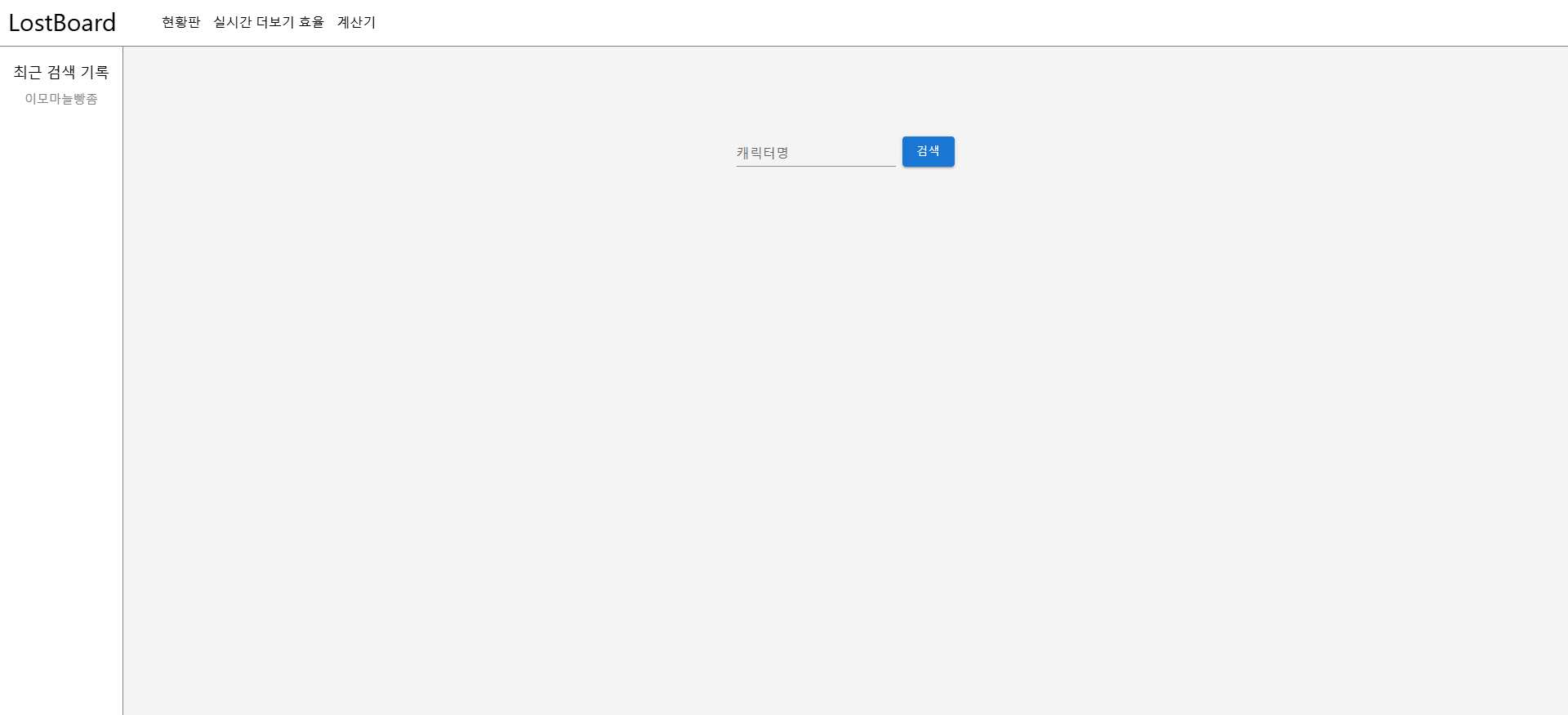
초기 화면
'LostBoard 프로젝트' 카테고리의 다른 글
| [LostBoard 프로젝트] 초기화면 디자인 수정 (0) | 2025.09.16 |
|---|---|
| [LostBoard 프로젝트] 초기 완성본 (0) | 2025.02.12 |
| [LostBoard 프로젝트] API를 활용하여 데이터 받아오기 (0) | 2025.01.08 |
| [LostBoard 프로젝트] 피그마 페이지 구성 (0) | 2025.01.06 |
| [LostBoard 프로젝트] 프로젝트 요구사항 명세 (0) | 2025.01.06 |