ejs 세팅
1. 터미널에 npm install ejs 입력해서 ejs 설치
2. 서버 파일 상단에 view engine 사용 코드 입력
app.set('view engine', 'ejs')
ejs 파일 만들어 보내주기
*ejs 파일은 views라는 폴더 안에 생성하는 것이 일반적
list.ejs 파일 생성후 간단한 html 코드 작성
<!DOCTYPE html>
<html>
<head>
    <meta charset="UTF-8">
    <meta name="viewport" content="width=device-width, initial-scale=1.0">
    <title>Document</title>
    <link href="/main.css" rel="stylesheet" />
</head>
<body class="grey-bg">

  <div class="white-bg">
    <div class="list-box">
      <h4>글제목1</h4>
      <p>글내용1</p>
    </div>
    <div class="list-box">
      <h4>글제목1</h4>
      <p>글내용2</p>
    </div>
  </div>

</body>
</html>
.grey-bg {
background: #eee;
}
.white-bg {
background: white;
margin: 20px;
border-radius: 5px;
}
.list-box {
padding : 10px;
border-bottom: 1px solid#eee;
}
.list-box h4{
font-size: 16px;
margin: 5px;
}
.list-box p {
font-size: 13px;
margin: 5px;
color: grey;
}
ejs 파일에 데이터 넣는법
app.get('/list', async (요청, 응답) => {
  let result = await db.collection('post').find().toArray()
  응답.render('list.ejs', { posts : result })
})
위에서 받은 데이터를 .ejs 파일에서 출력하는 문법
<%= posts %>
위 list.ejs 파일 수정
<!DOCTYPE html>
<html>
<head>
    <meta charset="UTF-8">
    <meta name="viewport" content="width=device-width, initial-scale=1.0">
    <title>Document</title>
    <link href="/main.css" rel="stylesheet" />
</head>
<body class="grey-bg">

  <div class="white-bg">
    <div class="list-box">
      <h4><%= posts[0].title %></h4>
      <p><%= posts[0].content %></p>
    </div>
    <div class="list-box">
      <h4><%= posts[1].title %></h4>
      <p><%= posts[1].content %></p>
    </div>
  </div>

</body>
</html>
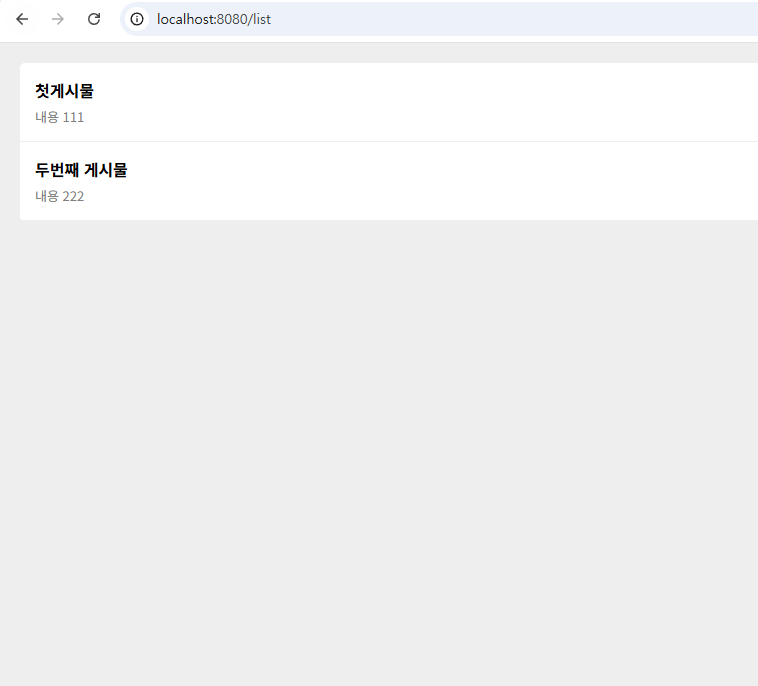
결과
ejs 파일 안에서 자바스크립트 문법 활용하기
<div class="white-bg">
      <% for(let i = 0; i < posts.length; i++){ %>
      <div class="list-box">
        <h4><%= posts[i].title %></h4>
        <p><%= posts[i].content %></p>
      </div>
      <% } %>
</div>
ejs 파일 안에 다른 ejs 파일 첨부하기
(views/nav.ejs)

<div class="nav">
  <a class="logo">Appleforum</a>
  <a>page1</a>
  <a>page2</a>
</div>


(list.ejs)

<%- include('nav.ejs') %>
<%- %> 와 <%= %> 차이
-<%- %> 의 경우 안의 내용이 html이라면 실제 html 처럼 렌더링 해준다. (ex. <%- <button> %> -> 버튼 출력)
-<%= %> 의 경우 안의 내용이 html이라도 html로 렌더링 하지 않고 실제 문자로 출력한다. (ex. <%= <button> %> -> <button> 출력)
'Node.js, MongoDB' 카테고리의 다른 글
| [Node.js, MongoDB] 6. POST 요청 (0) | 2025.05.31 |
|---|---|
| [Node.js, MongoDB] 5. REST API (0) | 2025.05.28 |
| [Node.js, MongoDB] 3. MongoDB에서 데이터 받아오기 (0) | 2025.05.28 |
| [Node.js, MongoDB] 2. MongoDB 세팅 (0) | 2025.05.26 |
| [Node.js, MongoDB] 1. Node.js, Express 초기 세팅 및 간단한 사용법 (0) | 2025.05.26 |